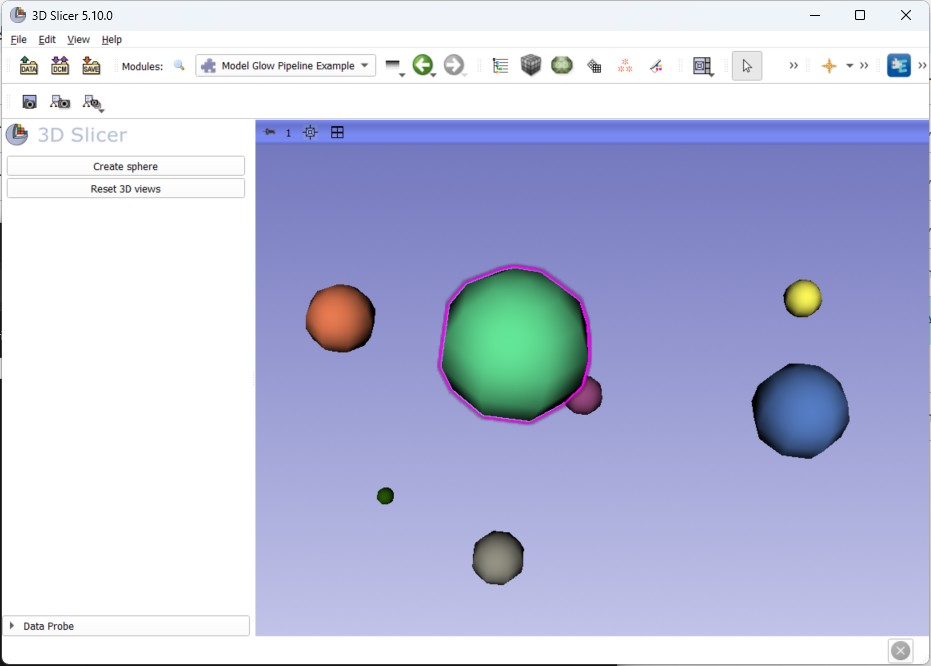
1"""
  2This example shows how to create a glow around a model node using the SlicerLayerDisplayableManager extension.
  3
  4It goes over the following concepts:
  5    - Creates a unique display pipeline to set attach a VTK glow pass to a renderer
  6    - Creates one glow display pipeline per 3D view for each created model nodes in the scene
  7    - Register the pipeline creation mechanism
  8
  9Usage:
 10    This example is implemented as a scripted module and can be added as such to Slicer.
 11    Once added, loading new model nodes will set their glow pass automatically.
 12"""
 13
 14import sys
 15import qt
 16import random
 17
 18import slicer
 19from slicer import (
 20    vtkMRMLAbstractViewNode,
 21    vtkMRMLInteractionEventData,
 22    vtkMRMLLayerDMPipelineFactory,
 23    vtkMRMLLayerDMPipelineScriptedCreator,
 24    vtkMRMLModelNode,
 25    vtkMRMLNode,
 26    vtkMRMLScene,
 27    vtkMRMLScriptedModuleNode,
 28    vtkMRMLTransformNode,
 29    vtkMRMLViewNode,
 30)
 31from slicer.ScriptedLoadableModule import ScriptedLoadableModule, ScriptedLoadableModuleWidget
 32from vtk import (
 33    VTK_OBJECT,
 34    calldata_type,
 35    vtkActor,
 36    vtkCommand,
 37    vtkGeneralTransform,
 38    vtkMath,
 39    vtkNamedColors,
 40    vtkOutlineGlowPass,
 41    vtkPolyDataMapper,
 42    vtkRenderStepsPass,
 43    vtkRenderer,
 44    vtkSphereSource,
 45    vtkTransformPolyDataFilter,
 46)
 47
 48from LayerDMLib import vtkMRMLLayerDMScriptedPipeline
 49
 50
 51class ModelGlowDM(ScriptedLoadableModule):
 52    def __init__(self, parent):
 53        ScriptedLoadableModule.__init__(self, parent)
 54        self.parent.title = " Model Glow Pipeline Example"
 55        self.parent.categories = ["qSlicerAbstractCoreModule", "Examples"]
 56        self.parent.dependencies = []
 57        self.parent.contributors = []
 58        self.parent.helpText = ""
 59        self.parent.acknowledgementText = ""
 60
 61        # At startup connected, the pipeline registration is called
 62        # This allows the pipeline registration to be done automatically at loading time
 63        slicer.app.connect("startupCompleted()", registerPipeline)
 64
 65
 66class _Pipeline(vtkMRMLLayerDMScriptedPipeline):
 67    """
 68    This class is a convenience abstract class for the glow pass pipelines.
 69    It provides the following static methods:
 70        - _CreatePipelineNode: Creates a new scripted node with a PipelineType string property containing the class type
 71            This value is used to check if the pipeline should be created when a node is added to the scene.
 72        - IsPipelineNode: Checks if a node is a scripted node and it contains the right PipelineType string property
 73        - TryCreatePipeline: Creates new pipeline instances for views matching 3D views and PipelineType nodes.
 74    """
 75
 76    @classmethod
 77    def _CreatePipelineNode(cls) -> vtkMRMLScriptedModuleNode:
 78        """
 79        Creates a new scripted node with a PipelineType string property containing the class type.
 80        This value is used to check if the pipeline should be created when a node is added to the scene.
 81
 82        In Python, inheritance of vtkMRMLDisplayNode is not possible to create new display node types.
 83        To bypass this limitation and create display data that will be used in the pipelines, we use
 84        vtkMRMLScriptedModuleNode instead.
 85
 86        vtkMRMLScriptedModuleNode can contain any pairs of string keys and string values.
 87        We use this mechanism to store the type of pipeline we would like to create for the given node.
 88
 89        The actual choice of attribute is arbitrary in this example and the creation logic can be adapted in actual
 90        application code.
 91
 92        Warning: Pipeline creation in the views is triggered by adding the node to the scene.
 93        vtkMRMLScriptedModuleNode properties should be initialized prior to adding the nodes to the scene.
 94        """
 95        node = vtkMRMLScriptedModuleNode()
 96        node.SetAttribute("PipelineType", cls._GetClassName())
 97        return node
 98
 99    @classmethod
100    def IsPipelineNode(cls, node):
101        """
102        Returns True if the input vktMRMLNode is a scripted node and has the pipeline type attribute matching the
103        current pipeline class.
104        """
105        return isinstance(node, vtkMRMLScriptedModuleNode) and node.GetAttribute("PipelineType") == cls._GetClassName()
106
107    @classmethod
108    def TryCreatePipeline(
109            cls, viewNode: vtkMRMLAbstractViewNode, node: vtkMRMLNode
110    ) -> vtkMRMLLayerDMScriptedPipeline | None:
111        """
112        Since we are creating pipelines for 3D views only, we check here if the view node is a ThreedView node and
113        if the node matches the current pipeline type (i.e. was created using the _CreatePipelineNode method).
114        """
115
116        if not cls.IsPipelineNode(node) or not isinstance(viewNode, vtkMRMLViewNode):
117            return None
118
119        return cls()
120
121    @classmethod
122    def _GetClassName(cls) -> str:
123        """
124        Convenience method to get the name of the current class.
125        This method will return the actual class name for inheriting classes.
126        """
127        return cls.__name__
128
129
130class GlowDMPassPipeline(_Pipeline):
131    """
132    The GlowDMPassPipeline is responsible for setting a glow render pass to the input renderer.
133    Since the pass only need to be set once, the following are used in this class:
134        - The data node is set to be a singleton data. This will make the data node persist in between scene clear.
135        - Setting and removing the render pass is done on renderer added / removed API calls.
136        - We set the pipeline to its own renderer (GetRenderOrder != 0) and we make it easy for other classes to know
137            the pipeline's render order by adding a convenience static method.
138
139    Note: This logic doesn't need to be split but is an example of possible implementation decoupling.
140    """
141
142    def __init__(self):
143        """
144        At creation, we call the super class initialization and create the VTK passes.
145        The VTK passes are then set during the API on renderer added / removed calls.
146        """
147        super().__init__()
148        self._basicPasses = vtkRenderStepsPass()
149        self._glowPass = vtkOutlineGlowPass()
150        self._glowPass.SetDelegatePass(self._basicPasses)
151
152    def OnRendererAdded(self, renderer: vtkRenderer) -> None:
153        """
154        Triggered when the pipeline is displayed on a new renderer.
155
156        When the renderer is added, we attach our glow pass.
157        Since we don't control the actual renderer used by the pipeline, this should be used systematically.
158        See also: self.GetRenderer()
159        """
160
161        if renderer is None:
162            return
163        renderer.SetPass(self._glowPass)
164
165    def OnRendererRemoved(self, renderer: vtkRenderer) -> None:
166        """
167        Triggered when the pipeline is removed from its previous renderer.
168
169        When the renderer is removed, we remove our glow pass.
170        Since we don't control the actual renderer used by the pipeline, this should be used systematically.
171        See also: self.GetRenderer()
172        """
173
174        if renderer is None:
175            return
176        renderer.SetPass(None)
177
178    def GetRenderOrder(self) -> int:
179        """
180        Arbitrary render order number where the pipeline wants to be displayed.
181        Return 0 to be at the default order (main 3D Slicer pipelines)
182        Return larger values to be rendered on top of pipelines with lower render orders.
183
184        :return: default = 0. Here we use a helper static method to return the Glow pass render order and allow
185            pipelines that want to be rendered in this renderer to use it as well.
186        """
187        return self.GetGlowPassRenderOrder()
188
189    @classmethod
190    def GetGlowPassRenderOrder(cls):
191        """
192        Convenience static method to return the glow pass render order and be used by other classes.
193        """
194        return 1
195
196    @classmethod
197    def EnsureGlowPass(cls, scene: vtkMRMLScene):
198        """
199        Convenience static method to add a singleton render glow pass data node to the scene.
200        The scene is passed in argument to avoid using the singleton slicer.mrmlScene which is not available in
201        trame-slicer.
202        """
203        if cls.SceneHasGlowPass(scene):
204            return
205
206        node = cls._CreatePipelineNode()
207        node.SetSingletonOn()
208        node.SetSingletonTag("RenderGlowPassPipeline")
209        scene.AddNode(node)
210
211    @classmethod
212    def SceneHasGlowPass(cls, scene: vtkMRMLScene) -> bool:
213        """
214        Convenience static method to check if the singleton glow pass data node is present in the scene.
215        The scene is passed in argument to avoid using the singleton slicer.mrmlScene which is not available in
216        trame-slicer.
217        """
218        return scene.GetNodeByID("RenderGlowPassPipeline") is not None
219
220
221class ModelGlowDMPipeline(_Pipeline):
222    """
223    The ModelGlowDMPipeline is responsible for the actual creation of actors (and mappers) that will be rendered
224    in the glow pass renderer.
225
226    In this pipeline, we do three things:
227        - Configure the rendering pipeline
228        - Connect the pipeline reactivity to the scene observers
229        - Connect the interaction events to make our model glow when the interaction is within the model's bounding box
230
231    Creation of the pipeline will be handled by our _Pipeline.TryCreatePipeline base methods and connected to the
232    factory in the registerPipeline method that we connected to the application load event.
233    """
234
235    def __init__(self):
236        """
237        In the pipeline creation, we create the different VTK objects.
238        Here, the mapper properties are static, but they could be set in the data node and be reactive.
239        """
240        super().__init__()
241
242        colors = vtkNamedColors()
243        self._glowMapper = vtkPolyDataMapper()
244        self._glowActor = vtkActor()
245        self._glowActor.SetMapper(self._glowMapper)
246        self._glowActor.GetProperty().SetColor(colors.GetColor3d("Magenta"))
247        self._glowActor.GetProperty().LightingOff()
248
249        # The two attributes below are used to connect observers on the modelNode and the modelTransform ModifiedEvent
250        # The vtkMRMLLayerDMScriptedPipeline base class provides convenience methods to simply observers
251        # See also: OnUpdate
252        # See also: UpdateObserver
253        self._modelNode = None
254        self._modelTransform = None
255
256        # The attribute below is used to store the transformed polydata.
257        # Its bounding boxes will be used for user interaction.
258        self._polyData = None
259
260    def OnRendererAdded(self, renderer: vtkRenderer) -> None:
261        """
262        Triggered when the pipeline is displayed on a new renderer.
263        default behavior: does nothing.
264
265        Here, we add our actor to the input renderer.
266        If the pipeline renderer has changed, the pipeline's ResetDisplay method will be triggered and in turn its
267        UpdatePipeline method will be triggered.
268
269        Since we don't control the actual renderer used by the pipeline, this should be used systematically.
270        See also: self.GetRenderer()
271        """
272
273        if renderer is None or renderer.HasViewProp(self._glowActor):
274            return
275        renderer.AddViewProp(self._glowActor)
276
277    def OnRendererRemoved(self, renderer: vtkRenderer) -> None:
278        """
279        Triggered when the pipeline is removed from its previous renderer.
280        default behavior: does nothing.
281
282        Here, we add our actor to the input renderer.
283        If the pipeline renderer has changed, the pipeline's ResetDisplay method will be triggered and in turn its
284        UpdatePipeline method will be triggered.
285
286        Since we don't control the actual renderer used by the pipeline, this should be used systematically.
287        See also: self.GetRenderer()
288        """
289
290        if renderer is None or not renderer.HasViewProp(self._glowActor):
291            return
292        renderer.RemoveViewProp(self._glowActor)
293
294    def GetRenderOrder(self) -> int:
295        """
296        Arbitrary render order number where the pipeline wants to be displayed.
297        Here, we use the glow pass's render order to be in the same renderer (although we don't know which it will be)
298        """
299        return GlowDMPassPipeline.GetGlowPassRenderOrder()
300
301    def UpdatePipeline(self):
302        """
303        Triggered by self.ResetDisplay() calls:
304            - Called automatically at pipeline creation / add to the render window
305            - Called automatically when switching renderer
306        Override to update the representation of the pipeline in the different views.
307
308        See also: self.RequestRender()
309        default behavior: does nothing.
310
311        Here, we update the mapper connection to our modelNode PolyData and update the actor visibility to follow
312        the model's visibility.
313        Finally we ask for a rendering refresh.
314        """
315        self._UpdateMapperConnection()
316        self._UpdateActorVisibility()
317        self.RequestRender()
318
319    def OnUpdate(self, obj, eventId, callData):
320        """
321        Observer update callback.
322        Triggered when any object & events observed using UpdateObserver is triggered.
323
324        :param obj: vtkObject instance which triggered the callback
325        :param eventId: Event id which triggered the callback
326        :param callData: Optional observer call data. Use self.CastCallData(callData, vtkType) to convert to Python
327
328        Here, we want to update our model transform node observer if it has changed and trigger the pipeline's display
329        when either the view has changed (observed by default), the data node has changed (observed by default), or
330        our modelNode / transform nodes have changed (manually observed).
331        """
332
333        if obj == self._modelNode:
334            self._ObserveModelTransformNode()
335
336        self.ResetDisplay()
337
338    def SetDisplayNode(self, node):
339        """
340        Set the display node for the pipeline has changed (initialization).
341        default behavior: Stored and display node is observed for vtkCommand::ModifiedEvent.
342        See also: self.UpdateObserver(prevObj, newObj, eventIds)
343        See also: self.OnUpdate(obj, eventId, callData)
344
345        :param node: The new instance of display node for the pipeline
346        """
347        super().SetDisplayNode(node)
348        self._ObserveModelNode()
349
350    def CanProcessInteractionEvent(self, eventData: vtkMRMLInteractionEventData) -> tuple[bool, float]:
351        """
352        Should return true + distance2 to interaction if the pipeline can process the input event data.
353        :param eventData: The MRML event needing to be processed
354        :return: (bool, distance2) default = False, float_max
355
356        Here, we check if the event interaction is within the glow pass actor bounds and return the distance to it.
357
358        To avoid blocking camera interaction, we will also process mouse move events.
359        Of course we could also check for left click to go further with this widget.
360
361        Note: This is not an efficient way to check for interactions. A better way would be to delegate to the model
362            display node for picking events.
363        """
364        # Only process mouse move events to avoid blocking camera interaction on click / drag
365        isMouseMoveEvent = eventData.GetType() == vtkCommand.MouseMoveEvent
366
367        if not isMouseMoveEvent or not self._IsModelVisible() or self._polyData is None:
368            return False, sys.float_info.max
369
370        pos = eventData.GetWorldPosition()
371        glowActorBounds = self._polyData.GetBounds()
372        isInBounds = (
373                glowActorBounds[0] < pos[0] < glowActorBounds[1]
374                and glowActorBounds[2] < pos[1] < glowActorBounds[3]
375                and glowActorBounds[4] < pos[2] < glowActorBounds[5]
376        )
377        distance2 = vtkMath.Distance2BetweenPoints(pos, self._polyData.GetCenter())
378        return isInBounds, distance2
379
380    def ProcessInteractionEvent(self, eventData: vtkMRMLInteractionEventData) -> bool:
381        """
382        Triggered when the pipeline can process the interaction and is at the top of the priority list.
383        default behavior: does nothing and returns false.
384
385        :param eventData: The MRML event needing to be processed
386        :return: True if event was processed. False otherwise (default = false)
387
388        Here, the pipeline is the closest to the interaction. We modify our display property which will trigger the
389        rendering update.
390        """
391        if not self.GetDisplayNode():
392            return False
393
394        self.GetDisplayNode().SetAttribute("IsSelected", str(1))
395        return True
396
397    def LoseFocus(self, eventData: vtkMRMLInteractionEventData | None) -> None:
398        """
399        Triggered when the pipeline had focus (processed an interaction) and loses the focus (other pipeline
400        handled the new interaction or window leave event).
401        default behavior: does nothing.
402        :param eventData: Optional event data which triggered the lose focus
403
404        Here, the pipeline lost the previous interaction.
405        We make sure to restore the selection state.
406        """
407        super().LoseFocus(eventData)
408        if not self.GetDisplayNode():
409            return
410        self.GetDisplayNode().SetAttribute("IsSelected", str(0))
411
412    def _UpdateMapperConnection(self):
413        """
414        Convenience method to update the mapper connection.
415        Note: We apply the polydata transform manually here, but we could configure a transform pipeline and use
416            the model's polydata connection instead for a cleaner VTK implementation.
417        """
418        modelNode: vtkMRMLModelNode = self._GetModelNode()
419        self._polyData = self._TransformPolyData(modelNode.GetPolyData() if modelNode else None)
420        self._glowMapper.SetInputData(self._polyData)
421
422    def _TransformPolyData(self, polyData):
423        """
424        Convenience method to update the transformed displayed polydata based on the current transform node.
425        """
426        transformNode = self._modelNode.GetParentTransformNode() if self._modelNode else None
427        if transformNode is None:
428            return polyData
429        transformFilter = vtkTransformPolyDataFilter()
430        transform = vtkGeneralTransform()
431        transformNode.GetTransformToWorld(transform)
432        transformFilter.SetTransform(transform)
433        transformFilter.SetInputData(polyData)
434        transformFilter.Update()
435        return transformFilter.GetOutput()
436
437    def _UpdateActorVisibility(self):
438        """
439        Convenience method to update the actor based on the model's visibility and the selection.
440        """
441        isSelected = bool(self.GetDisplayNode() and int(self.GetDisplayNode().GetAttribute("IsSelected")))
442        self._glowActor.SetVisibility(self._IsModelVisible() and isSelected)
443
444    @classmethod
445    def CreateGlowNode(cls, modelNode: vtkMRMLModelNode, scene: vtkMRMLScene):
446        """
447        Convenience static method to create and add a new glow data node pointing to a model node and add it to the
448        scene.
449
450        Note: Here, we could add our new data node as a reference node for the modelNode instead of keeping each
451            separate. This would allow to iterate over the modelNode's references and find it instead of having
452            to iterate on the scene.
453        """
454
455        # Since our nodes can store key / value strings, we set a new key for the model node ID for the model this
456        # glow effect will be attached to.
457        # We also store a selection value to be able to update the model glow on user interaction.
458        # We could store other display properties here as well (or point to a dedicated display node storing more
459        # information)
460        node = cls._CreatePipelineNode()
461        node.SetAttribute("ModelNodeID", modelNode.GetID())
462        node.SetAttribute("IsSelected", str(0))
463        return scene.AddNode(node)
464
465    @classmethod
466    def RemoveGlowNode(cls, modelNode: vtkMRMLModelNode, scene: vtkMRMLScene):
467        """
468        Convenience static method to remove a glow node set on a given modelNode.
469        See also: autoCreateGlowNode
470
471        Note: This logic can be simplified if we attach our pipeline to the model node directly.
472            We would then iterate over node references to check if we have our pipeline node.
473        """
474        for node in slicer.util.getNodesByClass("vtkMRMLScriptedModuleNode", scene):
475            if cls._GetModelNodeID(node) == modelNode.GetID():
476                scene.RemoveNode(node)
477
478    def _IsModelVisible(self) -> bool:
479        """
480        Convenience method to check if the pipeline's model node is visible.
481        """
482        modelNode = self._GetModelNode()
483        if modelNode is None:
484            return False
485        return bool(modelNode.GetDisplayVisibility())
486
487    def _GetModelNode(self) -> vtkMRMLModelNode | None:
488        """
489        Convenience method to get the model node associated with the pipeline's data node.
490
491        Here, we use the following APIs:
492            - GetScene: This will return the scene on which the pipeline is attached
493            - GetDisplayNode: This will return the pipeline's data node instance
494        """
495        return self.GetScene().GetNodeByID(self._GetModelNodeID(self.GetDisplayNode()))
496
497    def _ObserveModelNode(self):
498        """
499        Convenience method to update the model and the model's transform node observers.
500
501        Here, we use the UpdateObserver method:
502            - UpdateObserver(vtkObject* prevObj, vtkObject* obj, const std::vector<unsigned long>& events) -> bool
503            - UpdateObserver(vtkObject* prevObj, vtkObject* obj, unsigned long event = vtkCommand::ModifiedEvent) -> bool
504
505        This method should be used to add an observer on VTK object.
506        By default, the object's modified event will be observed.
507        The method also supports lists of events.
508
509        On modify event, the class's self.OnUpdate method will be called.
510
511        Warning: prevObj is not mutated by this call. To update the pointer, a manual set is required after update.
512
513        See also: self.OnUpdate
514        """
515        if self._modelNode == self._GetModelNode():
516            return
517
518        self.UpdateObserver(self._modelNode, self._GetModelNode())
519        self._modelNode = self._GetModelNode()
520        self._ObserveModelTransformNode()
521
522    def _ObserveModelTransformNode(self):
523        """
524        Convenience method to update the model's transform node observer.
525
526        Note: Here we explicitly observe the transform modified event as modifying the transform doesn't trigger
527        its modified event.
528
529        See also: self._ObserveModelNode
530        """
531        transformNode = self._modelNode.GetParentTransformNode() if self._modelNode else None
532        if self._modelTransform == transformNode:
533            return
534
535        self.UpdateObserver(self._modelTransform, transformNode, vtkMRMLTransformNode.TransformModifiedEvent)
536        self._modelTransform = transformNode
537
538    @classmethod
539    def _GetModelNodeID(cls, node):
540        """
541        Convenience method to get the model node ID attached to the input MRML node.
542        """
543        if cls.IsPipelineNode(node):
544            return node.GetAttribute("ModelNodeID")
545        return ""
546
547
548def registerPipeline():
549    """
550    For the pipeline registration, we will register the pipeline creation mechanism and auto create view nodes when
551    a new model node is added to the scene.
552    """
553    registerPipelineCreator()
554    autoCreateGlowNode()
555
556
557def registerPipelineCreator():
558    """
559    For pipelines to be created in our views, we need to use the pipeline factory to register pipeline creator
560    instances.
561
562    When a node is added to the scene, the LayerDM orchestration will query the vtkMRMLLayerDMPipelineFactory singleton
563    instance to check if a pipeline can be created.
564
565    The factory will receive two information: The view node on which it is attached and the newly created node.
566
567    To add a new creator to the factory, we use a vtkMRMLLayerDMPipelineScriptedCreator instance and set a callback
568    to our custom tryCreate function.
569
570    This function will iterate on the pipelines we want to create and create it when applicable.
571
572    Note: Scene lifecycle are managed by the LayerDM library. If the view is newly created, its pipeline manager will
573        iterate over all the nodes in the scene to check if pipelines need to be created.
574
575        Similarly, when loading a scene, clearing a scene, the pipelines will be handled accordingly.
576    """
577
578    def tryCreate(view_node, node):
579        pipelines = [GlowDMPassPipeline, ModelGlowDMPipeline]
580        for pipeline in pipelines:
581            ret = pipeline.TryCreatePipeline(view_node, node)
582            if ret is not None:
583                return ret
584        return None
585
586    pipeline_creator = vtkMRMLLayerDMPipelineScriptedCreator()
587    pipeline_creator.SetPythonCallback(tryCreate)
588    vtkMRMLLayerDMPipelineFactory.GetInstance().AddPipelineCreator(pipeline_creator)
589
590
591def autoCreateGlowNode():
592    """
593    This function is a convenience function to manage the data nodes in the scene.
594
595    Here, we attach two observers to the scene for node added / removed.
596    We then check to add our glow pipeline to model nodes when they are added and garbage collect them on removal.
597
598    We also create our glow pass data node so that the glow pass pipeline is created.
599    """
600
601    @calldata_type(VTK_OBJECT)
602    def onNodeAdded(_caller, _event, node):
603        if isinstance(node, vtkMRMLModelNode):
604            ModelGlowDMPipeline.CreateGlowNode(node, slicer.mrmlScene)
605
606    @calldata_type(VTK_OBJECT)
607    def onNodeRemoved(_caller, _event, node):
608        if isinstance(node, vtkMRMLModelNode):
609            ModelGlowDMPipeline.RemoveGlowNode(node, slicer.mrmlScene)
610
611    GlowDMPassPipeline.EnsureGlowPass(slicer.mrmlScene)
612    slicer.mrmlScene.AddObserver(vtkMRMLScene.NodeAddedEvent, onNodeAdded)
613    slicer.mrmlScene.AddObserver(vtkMRMLScene.NodeRemovedEvent, onNodeRemoved)
614
615
616class ModelGlowDMWidget(ScriptedLoadableModuleWidget):
617    """
618    In this example, the module's widget will allow us to create random sphere model nodes in the scene.
619    """
620
621    def setup(self) -> None:
622        """
623        In the setup method, we create a widget with only two buttons:
624            - A "create sphere" button to create a random sphere in the scene
625            - A "Reset 3D views" button to reset the 3D view on the created spheres
626        """
627        ScriptedLoadableModuleWidget.setup(self)
628
629        widget = qt.QWidget()
630        layout = qt.QVBoxLayout(widget)
631
632        createSphereButton = qt.QPushButton("Create sphere")
633        createSphereButton.clicked.connect(self._onCreateSphereClicked)
634        layout.addWidget(createSphereButton)
635
636        reset3DView = qt.QPushButton("Reset 3D views")
637        reset3DView.clicked.connect(slicer.util.resetThreeDViews)
638        layout.addWidget(reset3DView)
639        layout.addStretch()
640
641        self.layout.addWidget(widget)
642
643    @classmethod
644    def _onCreateSphereClicked(cls, *_):
645        """
646        Here we create the sphere models at random.
647
648        Note: Attaching the glow data to the model could be done in this type of methods if we wanted more control
649            on the creation logic.
650        """
651        # Create a sphere positioned at a random position
652        sphereSource = vtkSphereSource()
653        sphereSource.SetCenter(random.uniform(0, 10),
654                               random.uniform(0, 10),
655                               random.uniform(0, 10))
656        sphereSource.SetRadius(random.uniform(0.1, 1.0))
657        sphereSource.Update()
658
659        # Create the model node and set its polydata
660        modelNode = slicer.mrmlScene.AddNewNodeByClass("vtkMRMLModelNode")
661        modelNode.SetAndObservePolyData(sphereSource.GetOutput())
662        modelNode.CreateDefaultDisplayNodes()
663
664        # Set random color
665        displayNode = modelNode.GetDisplayNode()
666        modelNode.SetAndObserveDisplayNodeID(displayNode.GetID())
667        displayNode.SetColor(random.random(), random.random(), random.random())